Cute Lion
When you are designing materials for children, educators often face a specific challenge: how to convey warmth and approachability without sacrificing readability. This is where Cute Lion steps in as a distinctive solution. It is not just another whimsical typeface; it is a playful display font designed with a cheerful look that immediately captures attention. For bloggers, small business owners creating kid-centric brands, or teachers preparing classroom materials, understanding the nuances of this font can make the difference between a design that feels professional yet fun and one that looks amateurish.
Many creators assume that "cute" fonts are automatically easy to use. However, display fonts like Cute Lion require a strategic approach. If used incorrectly, they can undermine your message rather than enhance it. This guide explores the practical applications of Cute Lion, common pitfalls to avoid, and how to leverage its childlike playfulness effectively across various projects.
Understanding the Character of Cute Lion
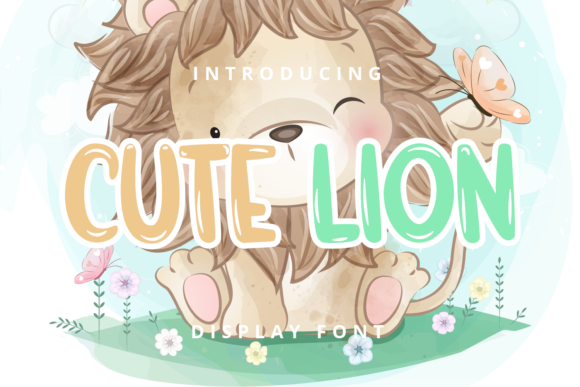
The primary appeal of Cute Lion lies in its visual personality. The letterforms are rounded, bouncy, and inviting, mimicking the aesthetic of hand-drawn illustrations. This makes it an excellent choice for titles, headers, and short phrases. It works particularly well when paired with simpler, more legible body text. The font’s structure suggests energy and joy, making it ideal for:
- School Projects: Posters, name tags, and certificates that need to feel special and encouraging.
- Children’s Products: Packaging for toys, snacks, or educational games where shelf appeal matters.
- Digital Content: Blog headers, social media graphics, and email newsletters targeting parents or young audiences.
However, the very qualities that make it charming—its irregular baselines and decorative curves—can hinder readability if applied to long passages of text. Recognizing these limitations is the first step toward using the font successfully.
Common Mistakes When Using Display Fonts
Even experienced designers sometimes fall into traps when incorporating playful typefaces into their workflow. Here are the most frequent errors associated with fonts like Cute Lion and how they impact your final output.
Overusing the Font for Body Text
The most significant mistake is using Cute Lion for paragraphs of text. Because the letters vary in height and width to maintain their playful character, reading large blocks of this font causes eye strain and reduces comprehension speed. When a reader struggles to decode the words, they disengage from your content entirely. Whether you are writing a blog post or drafting a lesson plan, always reserve Cute Lion for headlines, pull quotes, or labels. Use a clean sans-serif or serif font for the main body to ensure clarity and accessibility.
Neglecting Contrast in Pairings
A common misunderstanding is that a cute font needs a "cute" partner. While pairing Cute Lion with another whimsical script might seem harmonious, it often results in visual chaos. The eye does not know where to rest. Instead, pair Cute Lion with a neutral, highly legible font. A simple geometric sans-serif or a classic humanist serif provides the necessary stability to balance the font's exuberance. This contrast ensures that the headline pops while the information remains easy to digest.
Ignores Spacing and Hierarchy
Playful fonts often have unique kerning (space between characters) requirements. Users frequently apply standard spacing settings, which can lead to letters colliding or floating too far apart, breaking the intended shape. Furthermore, failing to establish a clear hierarchy—where the title is significantly larger than the subtitle—can make designs look cluttered. Always adjust tracking and leading (line spacing) manually when working with display fonts to respect their unique geometry.
Evaluating Licensing and Usage Rights
Before downloading or purchasing Cute Lion, it is crucial to verify the licensing terms. Many users assume that all free fonts are safe for commercial use, but this is rarely the case. Some licenses restrict usage to personal projects only, meaning you cannot use the font on products you sell, such as t-shirts, mugs, or digital courses.
If you are a freelancer or a small business owner, check whether the license includes:
- Personal Use: Allowed for non-profit projects, school assignments, or personal blogs.
- Commercial Use: Required for any project that generates revenue or promotes a brand.
- Web Embedding: Necessary if you plan to host the font on your website via CSS.
Purchasing the wrong license can lead to legal issues and unexpected costs later. Always read the end-user license agreement (EULA) carefully. If the font is sold by a reputable foundry, the terms will be clear. If you find it on a random file-sharing site, proceed with caution, as the quality and legality may be questionable.
Practical Tips for Better Results
To get the most out of Cute Lion, consider these actionable strategies that enhance both aesthetics and functionality.
Use Color Strategically
The font’s cheerful look is amplified by color. Avoid dark, heavy colors like pure black, which can make the rounded edges look harsh. Instead, try soft pastels, bright primaries, or warm earth tones. These colors complement the friendly nature of the letters and create a cohesive visual identity. For example, using a coral or teal version of Cute Lion for a header can instantly signal a relaxed, creative atmosphere.
Limit the Word Count
Treat Cute Lion like a highlighter, not a pen. Use it for short, impactful words. Titles like "Welcome," "Fun Time," or "Project Idea" work beautifully. Long sentences lose their charm because the irregular shapes become distracting. By keeping the text brief, you allow the font’s character to shine without overwhelming the viewer.
Test at Different Sizes
Display fonts often behave differently when scaled down. A logo-sized headline might look perfect, but the same font at 12 points on a flyer might become illegible. Always preview your design at the actual size it will be viewed. If the details get muddy or the letters merge together, switch to a simpler font for that specific application.
Conclusion on Best Practices
Cute Lion is a powerful tool for adding personality to your designs, but it requires respect for its limitations. By avoiding the trap of overuse, choosing appropriate pairings, verifying licenses, and applying strategic styling, you can create materials that are both visually engaging and professionally polished. Whether you are a teacher making a classroom bulletin board or a marketer launching a new kids' product, understanding how to wield this playful display font effectively will elevate your work and communicate your message with clarity and joy.