Integrating Lucky Day Display Font into Professional Design Workflows
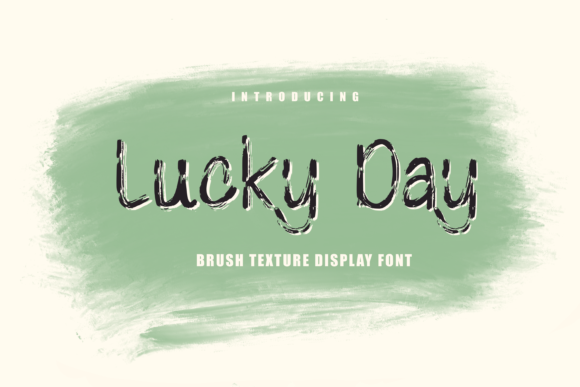
Selecting the right typography is rarely just an aesthetic choice; it is a fundamental component of visual communication strategy. For designers, marketers, and content creators, the font serves as the voice of the brand before a single word is read. Among the vast array of typefaces available, Lucky Day stands out as a distinctively cool and brushed display font that offers specific utility in high-impact visual contexts. Unlike standard body text fonts designed for readability over long passages, Lucky Day is engineered to grab attention, convey mood, and establish immediate tone.
This article explores how to effectively integrate Lucky Day into professional workflows, from initial concept development to final asset production. By understanding its characteristics—specifically its brushed, casual yet polished aesthetic—creators can leverage this tool to enhance crafting projects, digital designs, presentations, and greeting cards with precision and consistency.
Understanding the Typography Profile
Before implementing any design element, one must understand its functional boundaries. Lucky Day is classified as a display font, which means it is intended for use at larger sizes where legibility is less critical than impact. Its "brushed" style mimics the texture of paint applied with a brush, offering organic variation within each letterform. This characteristic makes it inherently informal but sophisticated enough for commercial use.
The font’s appeal lies in its balance. It avoids the rigidity of geometric sans-serifs while maintaining enough structure to remain readable. For professionals in marketing or small business ownership, this translates to a versatile asset that can communicate friendliness without sacrificing professionalism. When evaluating Lucky Day for a project, consider the following attributes:
- Visual Texture: The brushed edges provide depth, allowing the text to stand out against solid backgrounds or subtle patterns.
- Tone: It conveys creativity, approachability, and modern energy.
- Application Scope: Ideal for headlines, titles, logos, and short phrases rather than paragraphs of body copy.
Pre-Production: Planning and Conceptualization
Effective design begins long before opening software like Adobe Illustrator or Canva. During the planning phase, identifying where Lucky Day fits into the broader visual hierarchy is crucial. Because it is a display font, it should not be used indiscriminately. Instead, treat it as a strategic accent.
For educators and bloggers, this might mean using Lucky Day for section headers or pull quotes to break up dense text. For entrepreneurs launching a product, it could serve as the primary typeface for packaging labels or social media banners. The key is to define the role early. Ask yourself: Does this project require a voice that feels handcrafted? If so, Lucky Day is a strong candidate. If the message requires strict neutrality or technical precision, a serif or neutral sans-serif would be more appropriate.
Organize your assets during this stage. Ensure you have the correct file formats (typically .OTF or .TTF) readily accessible in your designated font library. Consistency in asset management prevents delays during the execution phase. Additionally, create a style guide snippet that defines the minimum size, color contrast requirements, and pairing recommendations for Lucky Day. This preparation ensures that anyone collaborating on the project maintains visual integrity.
Implementation in Digital Design and Branding
Once the concept is defined, the implementation phase involves integrating Lucky Day into digital workflows. This is where compatibility and technical execution become paramount.
Digital Presentations and Marketing Materials
In the realm of presentations, first impressions matter. Slides filled with generic corporate fonts often fail to engage audiences. Incorporating Lucky Day into title slides or key takeaway sections can inject energy and focus attention. However, integration requires care. Pair Lucky Day with a clean, simple sans-serif for body text. The contrast between the bold, textured display font and the neutral body font creates a visual rhythm that guides the viewer’s eye.
When exporting these designs for email newsletters or web banners, ensure that the font renders correctly across devices. While web fonts allow for dynamic embedding, static images (PNG/JPG) are often safer for broad compatibility. Use high-resolution exports to preserve the fine details of the brushed texture. Blurry rendering can undermine the premium feel of the font.
Social Media Content Strategy
For freelancers and marketers managing social media channels, visual consistency builds brand recognition. Lucky Day can be used as a recurring element in story templates or post headers. To maintain efficiency, create reusable templates in tools like Canva or Photoshop. Embed the font into these templates so that team members can swap out text without worrying about formatting errors.
Consider the context of the platform. On visually dense platforms like Instagram or Pinterest, the unique texture of Lucky Day helps content stand out in a crowded feed. Use it sparingly—perhaps for one word per graphic—to maximize impact without overwhelming the viewer.
Crafting and Physical Product Integration
Lucky Day is particularly well-suited for physical applications, such as crafting, scrapbooking, and custom stationery. The brushed aesthetic translates beautifully to physical mediums, mimicking hand-lettering techniques that are highly valued in the hobbyist and artisan markets.
Print Production Considerations
When moving from digital to print, several factors influence the final outcome. First, resolution is critical. Print requires a minimum of 300 DPI to ensure the brushed edges remain sharp. Low-resolution files will appear pixelated, losing the organic charm of the font.
Second, consider the substrate. Lucky Day performs exceptionally well on textured papers, cardstock, or matte finishes. The interaction between the ink and the paper surface enhances the brushed effect. Glossy surfaces may cause glare, obscuring the finer details. Test prints are essential here. Always produce a physical proof before committing to a large run, especially for personalized items like wedding invitations or event programs.
Greeting Cards and Stationery
For those creating greeting cards, Lucky Day offers a personal touch that resonates with recipients. It bridges the gap between formal typography and handwritten notes. When designing cards, use Lucky Day for the main sentiment or recipient name. Pair it with delicate line art or watercolor elements to complement its artistic nature. Avoid cluttering the design; let the font breathe with ample white space.
Workflow Optimization and Quality Control
Integrating a specialized font like Lucky Day into a daily workflow requires systematic organization. Here are practical tips to streamline the process:
- Font Management: Use dedicated font management software to activate and deactivate fonts as needed. This keeps your system performance optimal and prevents conflicts with other projects.
- Pairing Guidelines: Maintain a list of proven font pairings. For example, Lucky Day pairs well with light weights of Helvetica, Lato, or Open Sans. Documenting these combinations speeds up the design process.
- Accessibility Checks: Ensure sufficient contrast between the font color and background. The textured nature of Lucky Day can sometimes reduce legibility if colors are too similar. Use contrast checkers to verify compliance with accessibility standards.
- Version Control: Keep track of font versions. Updates to typefaces can subtly alter spacing or character shapes, potentially disrupting established layouts.
Long-Term Value and Adaptability
Investing in a quality font like Lucky Day provides long-term value. As trends shift, classic display fonts often retain their relevance due to their timeless appeal. A brushed style evokes craftsmanship, a quality that remains desirable across industries. Whether you are a small business owner updating your logo or a blogger refreshing your site theme, Lucky Day offers flexibility.
However, adaptability also means knowing when not to use it. Overuse dilutes its impact. Reserve Lucky Day for moments that require emphasis, celebration, or creative expression. In data-heavy reports or legal documents, it has no place. By applying it strategically, you preserve its power to capture attention.
Conclusion
Lucky Day is more than just a decorative typeface; it is a strategic tool for visual storytelling. Its cool, brushed aesthetic allows it to bridge the gap between professional polish and creative warmth. By understanding its strengths, respecting its limitations, and integrating it thoughtfully into your design workflows, you can elevate your projects. From digital presentations to printed greeting cards, Lucky Day offers a reliable way to add personality and distinction to your work. Focus on preparation, maintain consistency, and always prioritize the user’s experience. In doing so, you harness the full potential of this versatile font to achieve clear, effective, and engaging outcomes.