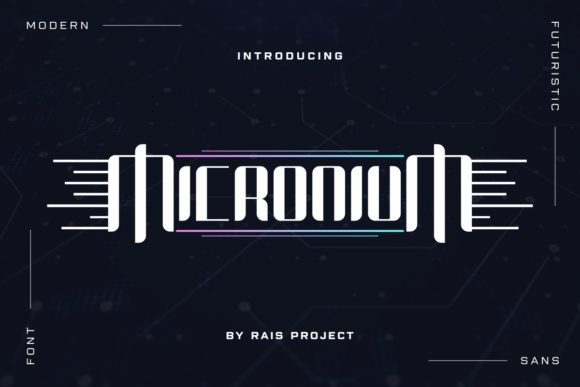
Micronium: The Display Font That Bridges the Gap Between Retro-Futurism and Modern Tech
When you are designing a logo for a new tech startup, creating a thumbnail for a high-energy gaming channel, or putting together a presentation for a modern software launch, the choice of typography can make or break your visual impact. You need something that screams "future" without looking like a cliché from a 1980s sci-fi movie. This is where Micronium steps in. It is not just another font; it is a carefully crafted display typeface that blends the geometric precision of techno aesthetics with a sleek, modern edge.
If you are a creator, entrepreneur, or marketer looking to inject a sense of innovation and sophistication into your projects, Micronium offers a versatile solution. It is designed to catch the eye, convey authority, and fit seamlessly into digital-first environments. Let’s look at why this specific font has become a go-to resource for professionals who need their designs to stand out in a crowded digital landscape.
Understanding the Aesthetic: What Makes Micronium Unique?
Micronium belongs to the family of display fonts, which means it is designed to be read at larger sizes rather than in long paragraphs of body text. Its character lies in its clean lines, sharp angles, and balanced proportions. Unlike overly decorative fonts that distract from the message, Micronium enhances readability while maintaining a distinct personality.
The font draws inspiration from the technological advancements of the late 20th century but refines them for contemporary tastes. It feels familiar to anyone who has spent time in the world of computer interfaces, yet it avoids the dated look of early bitmap fonts. Instead, it offers a polished, vector-like clarity that looks crisp on both high-resolution screens and printed materials. This balance between nostalgia and modernity is what makes it so appealing across various industries.
Key Characteristics for Designers
- Geometric Precision: The letters are constructed with mathematical accuracy, giving them a stable and trustworthy appearance.
- Tech-Forward Vibe: The styling subtly hints at circuitry, data streams, and digital architecture without being literal.
- High Legibility: Despite its stylized nature, Micronium remains easy to read, even at smaller sizes within headers.
- Versatile Weight Options: Most variations of the font include multiple weights, allowing for hierarchy in design layouts.
Real-World Applications: Where Micronium Shines
Knowing a font looks good is one thing; knowing when to use it is another. Micronium is particularly effective in scenarios where you need to communicate speed, precision, and forward-thinking values. Here are some practical situations where this font delivers real results.
Gaming and Esports Branding
The gaming industry is saturated with aggressive, bold, and often chaotic visual styles. However, there is a growing segment of gamers and streamers who prefer a cleaner, more professional aesthetic. For esports teams, tournament organizers, or gaming hardware brands, Micronium provides a way to look competitive without looking cluttered. Imagine a team logo that uses the sharp edges of Micronium to suggest agility and tactical precision. It works exceptionally well for jersey designs, overlay graphics for Twitch streams, and promotional posters for LAN parties.
Furthermore, game developers working on cyberpunk or futuristic strategy games can use Micronium for user interface (UI) elements. The font’s inherent structure mimics the look of heads-up displays (HUDs), making it an intuitive choice for labeling health bars, ammo counts, or mission objectives. It helps players process information quickly because the font style reinforces the context of the game.
Technology and SaaS Products
If you are launching a new app, a cloud computing service, or a cybersecurity tool, your branding needs to scream reliability and innovation. Micronium fits perfectly into the tech ecosystem. It is ideal for landing pages, feature lists, and product packaging. When users see Micronium used consistently across a website’s header and call-to-action buttons, it subconsciously signals that the company is organized, efficient, and up-to-date.
Consider a software developer creating a dashboard for data analytics. Using Micronium for the chart titles and key metrics ensures that the data stands out against a busy background. The font’s clarity prevents cognitive overload, helping users focus on the insights rather than struggling to decipher the labels. This is a subtle but powerful way to improve user experience (UX) through typography.
Business and Corporate Identity
Not every business wants to look like a traditional bank or a law firm. Startups in fintech, AI, and robotics often need a brand identity that feels dynamic and disruptive. Micronium allows these companies to break away from serif-heavy corporate fonts. It is excellent for business cards, pitch decks, and conference banners. When presenting to investors, using a font like Micronium in your title slides can help position your company as a modern player in the market.
For small business owners, especially those in the creative or freelance sectors, Micronium offers a cost-effective way to elevate their brand. You don’t need a custom-designed typeface to look professional. By incorporating Micronium into your social media templates, email newsletters, and invoice designs, you create a cohesive visual language that builds recognition and trust with your clients.
Educational and Digital Content
Educators and content creators are increasingly moving towards video-based learning and interactive web content. Micronium is a great choice for YouTube thumbnails, course titles, and infographic headers. In an era where attention spans are short, a strong, distinctive font can stop the scroll. A tutorial on coding, engineering, or digital marketing will feel more authoritative if the title card uses a font that reflects the technical nature of the subject matter.
Blogger and publishers focusing on technology news can also benefit. Using Micronium for section headers or pull quotes adds a layer of visual interest that breaks up the monotony of standard body text. It guides the reader’s eye through the article, highlighting key points without requiring excessive use of color or images.
Practical Considerations Before You Use Micronium
While Micronium is a powerful tool, it is not a one-size-fits-all solution. To get the most out of this font, you need to apply it strategically. Here are a few things to keep in mind before downloading and implementing it in your next project.
- Pairing is Key: Micronium is a display font, so it should not be used for long blocks of text. Pair it with a simple, neutral sans-serif font for body copy. Fonts like Roboto, Open Sans, or Lato work well because they do not compete with Micronium’s strong personality. This contrast creates a balanced layout where the headline grabs attention and the body text provides comfort.
- Context Matters: As mentioned, Micronium excels in tech, gaming, and modern business contexts. It might feel out of place in a wedding invitation, a children’s book, or a traditional bakery menu. Always consider the tone of your message. If your brand is warm, organic, or heritage-focused, a softer, more humanist font would be a better fit.
- Licensing and Usage Rights: Before using Micronium commercially, ensure you understand the licensing terms. Some fonts are free for personal use but require a paid license for commercial projects. Others may have restrictions on how many times they can be used or in what mediums. Respecting intellectual property protects your business and supports the designers who create these tools.
- Accessibility: While Micronium is legible, always test your designs for accessibility. Ensure there is sufficient contrast between the font color and the background. Avoid using the lightest weight of the font on complex backgrounds, as this can reduce readability for users with visual impairments.
Conclusion: Elevating Your Visual Communication
In a world where visual communication happens in milliseconds, choosing the right font is a strategic decision. Micronium offers a blend of retro-futuristic charm and modern professionalism that resonates with today’s audiences. Whether you are building a brand for a tech startup, designing a game interface, or creating educational content, Micronium provides the visual punch needed to capture attention.
The key to success lies in application. Use Micronium to highlight important messages, establish a tech-savvy identity, and guide your audience’s eye. By pairing it thoughtfully with complementary fonts and respecting its limitations, you can create designs that are not only beautiful but also effective. So, the next time you sit down to design, consider letting Micronium bring a touch of tomorrow’s technology to your current project.