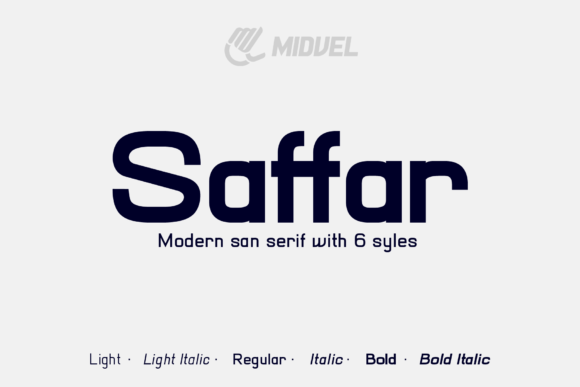
Saffar: Why This Modern Display Font Is a Smart Choice for Bold Branding
If you are looking to make a statement that is both contemporary and effortlessly cool, Saffar deserves a spot on your shortlist. It is not just another generic sans-serif; it is a display font designed with a distinct personality. Whether you are a graphic designer crafting a brand identity, a small business owner creating marketing materials, or a hobbyist designing custom t-shirts, understanding the nuances of this typeface can significantly elevate your visual communication.
Many creators gravitate toward Saffar because of its clean lines and modern aesthetic, but using it effectively requires more than just dragging and dropping text into a design tool. To get the most out of this font, you need to understand where it shines, where it might fall flat, and how to pair it correctly to avoid common design pitfalls.
Understanding the Appeal of Saffar
Saffar is categorized as a display font, which means it is optimized for large sizes rather than body text. Its structure is sleek, geometric yet approachable, making it ideal for headlines, logos, and promotional graphics. The font’s "cool" factor comes from its balanced proportions and subtle stylistic details that give it a premium feel without being overly ornate.
This versatility is why it appears frequently in sportswear branding, streetwear apparel, and digital advertisements. When used correctly, Saffar communicates confidence and modernity. It works well for:
- Logos and Brand Marks: Its strong letterforms provide stability and recognition.
- T-Shirt Graphics: The bold weight stands out against fabric textures.
- Social Media Ads: High readability at small screen sizes when scaled properly.
- Event Posters: It captures attention quickly due to its striking presence.
However, the very qualities that make Saffar effective for headlines can become liabilities if misapplied. Before you download or purchase a license, consider these common mistakes and how to avoid them.
Mistake #1: Using Display Fonts for Body Copy
The most frequent error designers make with fonts like Saffar is assuming they can be used for long-form reading. While Saffar looks stunning at 72pt or larger, it becomes difficult to read when shrunk down to paragraph size. The spacing (kerning) and stroke width are calibrated for impact, not endurance.
Why this matters: If you use Saffar for the main text of a brochure or website article, your audience will struggle to read it. This leads to higher bounce rates on websites and lower engagement with printed materials. It creates a barrier between your message and your reader.
The Better Approach: Reserve Saffar for titles, subtitles, buttons, and key phrases. Pair it with a highly readable serif or sans-serif font for body text. For example, combine Saffar for the headline with a clean, neutral font like Open Sans or Merriweather for the supporting content. This contrast creates hierarchy and ensures your design is both beautiful and functional.
Mistake #2: Ignoring Licensing and Usage Rights
Another critical oversight involves the legal aspect of using Saffar. Because it is a commercial-grade font, improper licensing can lead to costly legal issues. Many users assume that because they found the font online, they can use it freely for any project, including selling merchandise.
Why this matters: Using a font without the correct license for commercial products (like t-shirts sold on Etsy or Amazon Merch) can result in takedown notices, fines, or account suspensions. Even for personal projects, some licenses restrict modification or redistribution.
The Better Approach: Always verify the license terms before starting a project. Check if the license covers:
- Personal Use: For non-monetized projects like school presentations or personal blogs.
- Commercial Use: For client work, advertising, or branded materials.
- Merchandising: Specifically for printing on physical goods like clothing, mugs, or posters.
If you plan to sell designs featuring Saffar, ensure you have a license that explicitly permits merchandising. This protects your business and respects the type designer’s intellectual property.
Mistake #3: Poor Color Contrast and Background Clashing
Saffar’s modern aesthetic often relies on thin or medium weights that require careful handling regarding color contrast. A common mistake is placing light gray Saffar text over a white background or dark blue text over a black background. While this might look stylish in a mockup, it fails in real-world applications.
Why this matters: Low contrast reduces accessibility and readability. Users with visual impairments may not be able to read your message at all. Furthermore, poor contrast makes your design look unpolished and amateurish, undermining the professional image you are trying to build.
The Better Approach: Test your text in grayscale first. If you cannot easily distinguish the letters from the background in black and white, you will likely have contrast issues in color. Aim for a minimum contrast ratio of 4.5:1 for normal text. For bold display uses, high-contrast combinations like black on white or white on black are safest and most impactful.
Mistake #4: Overlooking Kerning and Letter Spacing
Even with a well-designed font like Saffar, default settings may not always yield the best results. Designers often leave the default kerning (space between characters) unchanged, which can lead to awkward gaps or cramped letters, especially in wide headlines.
Why this matters: Poor spacing disrupts the visual flow of the text. It can make a logo look sloppy or an advertisement feel rushed. In display typography, every pixel counts, and inconsistent spacing draws negative attention to the flaws rather than the message.
The Better Approach: Manually adjust kerning for important headings and logos. Zoom in to 100% or higher to inspect the spaces between letters. Look for optical imbalances—for instance, the space between 'A' and 'V' might need tightening, while 'I' and 'L' might need widening. Take your time; good typography is invisible when done right.
What to Check Before You Commit
Before finalizing your decision to use Saffar in a major project, run through this quick checklist:
- Legibility at Size: Does it remain clear at the smallest size it will appear?
- Pairing Compatibility: Do you have a suitable companion font for body text?
- Licensing Fit: Does the license cover your specific use case (e.g., merch, web, print)?
- Brand Alignment: Does the "cool and modern" vibe match your brand voice? If you are a traditional law firm, Saffar might feel too casual.
- File Format: Ensure you have the necessary file formats (OTF, TTF, WOFF2) for your intended platform.
Final Thoughts on Using Saffar Effectively
Saffar is a powerful tool in the designer’s arsenal. Its ability to convey modernity and style makes it a favorite for brands wanting to stand out. However, success lies in restraint and precision. By avoiding the trap of overuse, respecting licensing agreements, ensuring high contrast, and paying attention to spacing, you can leverage Saffar to create designs that are not only visually appealing but also effective and professional.
Remember, a font is only as good as its application. Treat Saffar with care, pair it wisely, and use it where it adds value. When done right, it transforms simple text into a compelling visual statement that resonates with your audience.